
A robust embedded systems project that transforms an ESP32 into a smart, web-controlled remote for my Electra air conditioning unit. This project showcases skills in reverse engineering, real-time operating systems (FreeRTOS), and full-stack embedded development, from hardware interfacing to a user-facing web server.
✨ Key Features
- 🌐 Web-Based Control: A sleek, mobile-friendly web interface to turn the AC on or off from any device on the local network.
- RTOS-Powered: Leverages the FreeRTOS real-time operating system for efficient, concurrent task management.
- ⚙️ Multi-Core Processing: Intelligently separates tasks between the ESP32’s dual cores—Core 0 handles Wi-Fi and the web server, while Core 1 is dedicated to precise, real-time IR signal generation.
- 🔧 Reverse Engineered: The AC remote’s proprietary IR signal was captured, decoded, and reverse-engineered using an oscilloscope.
- 🛡️ Robust Synchronization: Employs binary semaphores to ensure safe and reliable communication between the web server task and the IR transmission task.
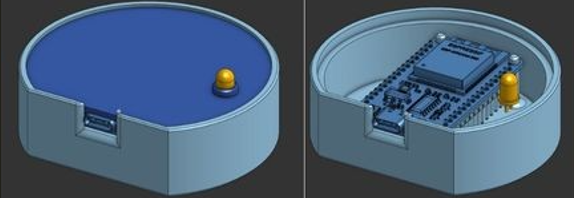
- 🔌 Custom Hardware: Housed in a custom-designed 3D printed enclosure for a clean and professional finish.
🛠️ Hardware
- Microcontroller: ESP32-WROOM-32
- Transmitter: 5mm 940nm IR LED
- Resistor: Preferably 100-200 Ohm resistor. (Closer to 100 produces stronger signal)
- Power: 5V USB-C Power Supply
- Enclosure: Custom 3D Printed Case
📦 3D Printed Enclosure
The custom-designed enclosure provides a compact and durable housing for the electronics.
3D printed case.
🏗️ System Design
The software architecture is designed for stability and real-time performance, leveraging the power of FreeRTOS and the ESP32’s dual-core capabilities.
Task Management with FreeRTOS
The application is divided into two primary tasks:
Web Server & Wi-Fi Task (Core 0): This task is responsible for:
- Initializing and maintaining the Wi-Fi connection.
- Running the HTTP web server to serve the HTML control page.
- Listening for incoming
/toggleGET requests from the user’s browser. - Upon receiving a request, it gives a binary semaphore to signal the IR task.
IR Transmission Task (Core 1): This task is pinned to Core 1 to guarantee its execution is not preempted by the higher-priority Wi-Fi stack running on Core 0. Its responsibilities are:
- Waiting indefinitely to take the binary semaphore.
- Once the semaphore is received, it executes the
ac_power_code()function to generate the precise sequence of IR pulses.
This separation ensures that the timing-critical IR signal generation is never delayed, which is crucial for the AC unit to correctly interpret the signal.
// IR code sending task - Pinned to Core 1 for real-time precision
xTaskCreatePinnedToCore(
    toggle_ac_task,
    "Send AC code task",
    1024,
    NULL,
    0,
    NULL,
    1
);
🚀 Installation & Usage
Clone the repository:
git clone
Configure Wi-Fi Credentials: Open main.c and update the SSID and PASS macros with your network details.
#define SSID “YOUR_WIFI_SSID” #define PASS “YOUR_WIFI_PASSWORD”
Build and Flash: Using PlatformIO, build and upload the project to the ESP32.
Find the IP Address: Open the serial monitor to view the IP address assigned to the ESP32 once it connects to your Wi-Fi network.
Control Your AC: Open a web browser on any device connected to the same network and navigate to the ESP32’s IP address. Click the “Toggle AC” button to control your air conditioner.
🔮 Future Improvements
Full Remote Emulation: Decode and implement all buttons from the remote (temperature, fan speed, mode).
Cloud Integration: Connect the device to an MQTT broker for control over the internet.
State Feedback: Use a non-contact temperature sensor or a smart plug with power monitoring to confirm the AC’s state and display it on the web interface.
OTA Updates: Implement Over-The-Air firmware updates for easy maintenance.